
Article
A reMarkable planner that starts on 1 January 2027: Paper Pro, Paper Pure, reMarkable 2 and Move
If you want your 2027 planner to begin on New Year's Day, with no leftover pages for the end of 2026, the January edition of the Graphite Planner is made for that. It runs from 1 January to 31 December 2027 and comes in a layout for every current reMarkable: the reMarkable 2, the Paper Pure, the Paper Pro and the Paper Pro Move. This article covers what is inside, how it differs from the October start, which file to choose and how to get it onto your tablet with its links working.
What is inside
Each file opens on an Index with buttons for the year at a glance, goals for 2027, the four quarters and all twelve months. On the Large pages the months sit in three rows of four, lined up with the Q1 to Q4 buttons above them, so a quarter and its months are read together.
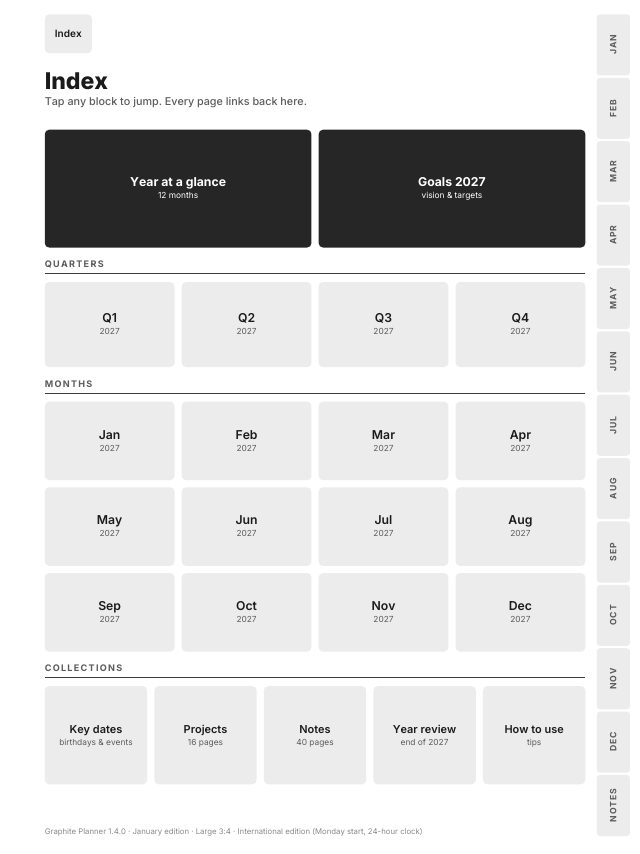
Behind the Index are 365 day pages, 53 week pages, 12 month pages with a habit tracker and a task page each, plans for Q1 to Q4, key dates on 2 pages, 16 project pages, 40 note pages and a 2027 in review page. Any page is at most two taps from the Index, and every page has Index in its top bar.
Only the dates change
The January edition is the same design as the October start, version 1.4: the same pages, buttons, layouts and tests. The difference is the calendar. It has 12 months instead of 15, four quarters instead of five, 13 side tabs instead of 16, and 524 to 527 pages per file instead of 639 to 643. There are no pages for October to December 2026.
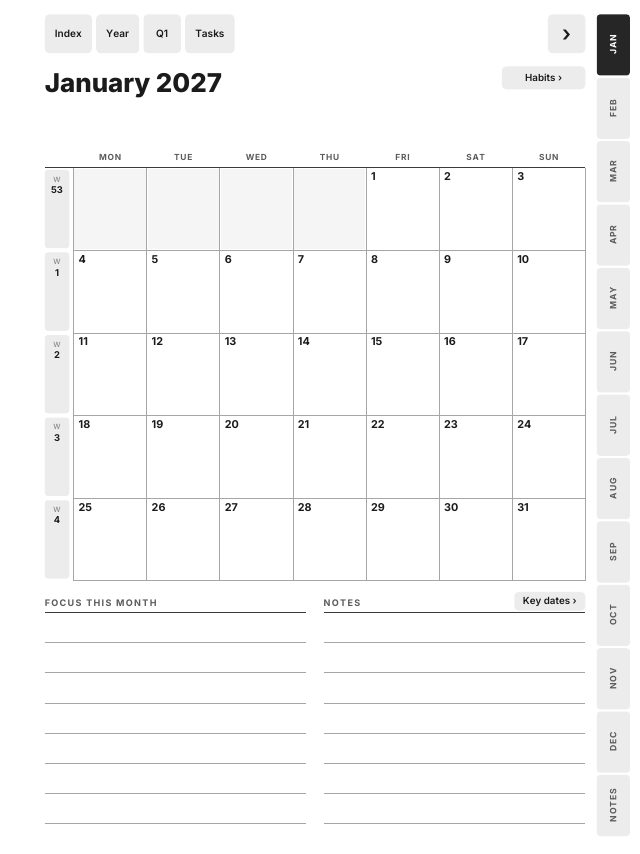
One detail is worth knowing. 1 January 2027 is a Friday, so the first week page begins on Monday 28 December in the Monday-start files, where it is Week 53, and on Sunday 27 December in the Sunday-start file. Those December days are printed in grey with no link. They are the only 2026 dates in the file. If you would rather start planning now, the October start covers 1 October 2026 to 31 December 2027, and October start or January start sets the two side by side.
Which file for your reMarkable
| Your reMarkable | Screen | File |
|---|---|---|
| reMarkable 2 | 10.3", 3:4 | Large 3:4 |
| Paper Pure | 10.3", 3:4 | Large 3:4 |
| Paper Pro | 11.8", 3:4 | Large 3:4 |
| Paper Pro Move | 7.3", 9:16 | Move 9:16 |
The three 3:4 screens share one file. On the Paper Pro the Large page is shown about 15 percent bigger than on a reMarkable 2, so text and buttons come out larger, never smaller. The pages are black and grey only, so they look the same on the colour screen of the Paper Pro.
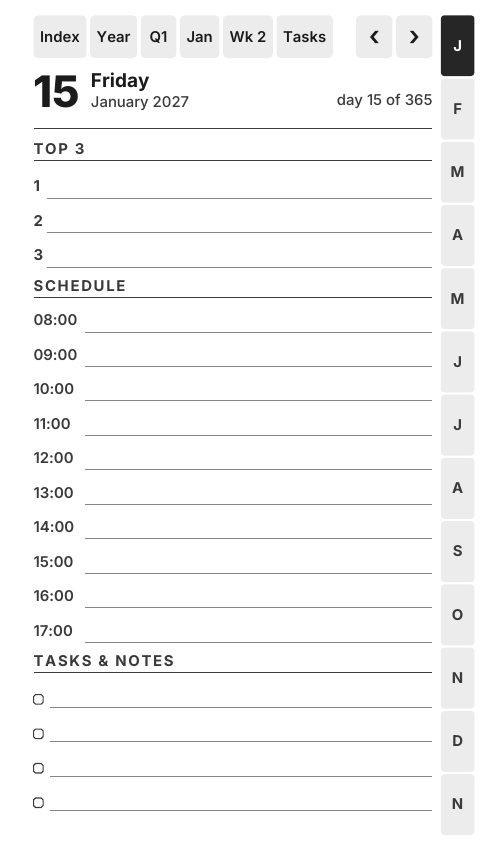
The Move needs its own file. Its tall 9:16 screen would show a 3:4 page with white bands above and below. The Move layout is drawn for 7.3 inches: no text smaller than 8 pt or lighter than a dark grey, a day schedule with one writing row per hour from 8 am to 5 pm, and the year at a glance on four pages, one quarter each.
Then pick an edition and a hand. There are three calendar editions: Sunday start with a 12-hour clock, Monday start with a 24-hour clock, and Monday start with a 12-hour clock. Each comes right-handed, with the month tabs on the right, or left-handed, with the tabs on the left. Match the hand to the side where your toolbar opens: that side has nothing to tap.
How to import it
- Unzip the download on a computer or phone. The tablet cannot open a zip. Take one PDF from the Large 3:4 zip, or from the Move 9:16 zip for the Move.
- Open the reMarkable desktop or mobile app, signed in to the same account as your tablet, and drag the PDF into it. It syncs and appears in My files.
- With a cable, you can use the USB web interface instead, as described in reMarkable's Transferring files using a USB cable article.
- Open the planner from My files. Write with the Marker and tap links with a fingertip. A tap with the Marker leaves a small stroke on the button instead.
Links in PDF documents need reMarkable software 3.3 or later. Import the planner as a document, not as a template: the template menu holds single backgrounds without links, and reMarkable's Templates help article says custom templates are not supported. How to add templates to reMarkable explains the difference.
A quick check after import
Open the Index and tap Jan. On the month, tap 4 to open Monday 4 January, then tap Wk 1 in the top bar to see the week, and Index to come back. If all four taps land, the planner is ready. All 278,558 links in the 24 files of the January edition are opened by three PDF readers and checked by script before release.
Every tablet, or only the Move
The all-device download has Large, Compact, Move and Kindle Scribe files. If a Paper Pro Move is your only tablet, the Move-only edition has just its six files and a setup guide. Both are in the January edition section of the planner page, and the reMarkable page lists everything else drawn for these tablets.
Frequently asked questions
- Is there a reMarkable planner that starts on 1 January 2027?
- Yes. The January edition of the Graphite Planner runs from 1 January to 31 December 2027, with 12 months and 365 day pages. The only 2026 dates are the grey days of the first week.
- Which file do I use on the reMarkable Paper Pro?
- Large 3:4. The same file fits the reMarkable 2 and the Paper Pure. The Paper Pro Move needs the Move 9:16 file.
- Can I add the planner to the reMarkable template menu?
- No. Import it as a document with the reMarkable app. That is what keeps its links working, and links need software 3.3 or later.