
Article
Keeping a reading journal on a Kindle Scribe: setup, the book index and monthly wrap-ups
A Kindle Scribe is a good home for a reading journal: your books are already on it, and the pen is clipped to its side. What makes a journal work on the tablet is how fast you reach the right page. This article covers how to put a reading journal PDF on a Scribe so that you can write in it, how the jump from the book index to a book's sheet works, and how to close each month.
Send it with Send to Kindle, not USB
The way the file reaches the Scribe decides whether you can write on it. Amazon's help page Kindle Personal Document File Types That Support Notes says you can write directly on the page in PDF documents imported through Send to Kindle, and that the Kindle Scribe doesn't support writing on PDFs loaded via USB-C.
- Unzip the download and take the Kindle Scribe file, right- or left-handed.
- Open Send to Kindle for Web in a browser and drag the PDF onto the page. The app and email work too, as described in Send PDF, EPUB and Other Files to Your Kindle.
- Leave conversion off. A converted PDF becomes a reflowed book with no pages and no links.
- Open it from your library. Write with the pen, and tap links with a finger, or choose the pointer tool before you tap with the pen.
The journal is 136 pages and about 0.36 MB, far below the 50 MB limit for email. Send to Kindle vs USB explains the two routes in full.
The book index
The index is the heart of the journal. It has 5 pages of 20 rows, one row per book, numbered 1 to 100. When you start a book, write its title and author on the next free row. That number is now the book's number for the whole year.
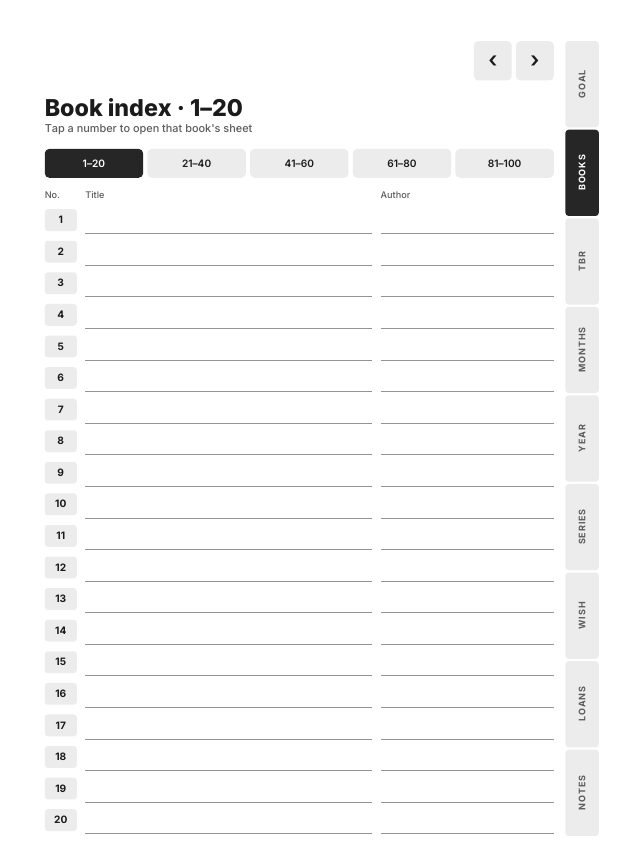
A bar at the top of each index page jumps between the five pages, so book 64 is one tap to its index page and one more to its sheet.
The jump from index to sheet
Tap a number and that book's sheet opens. On the Scribe that can be a jump of a hundred pages in one tap.
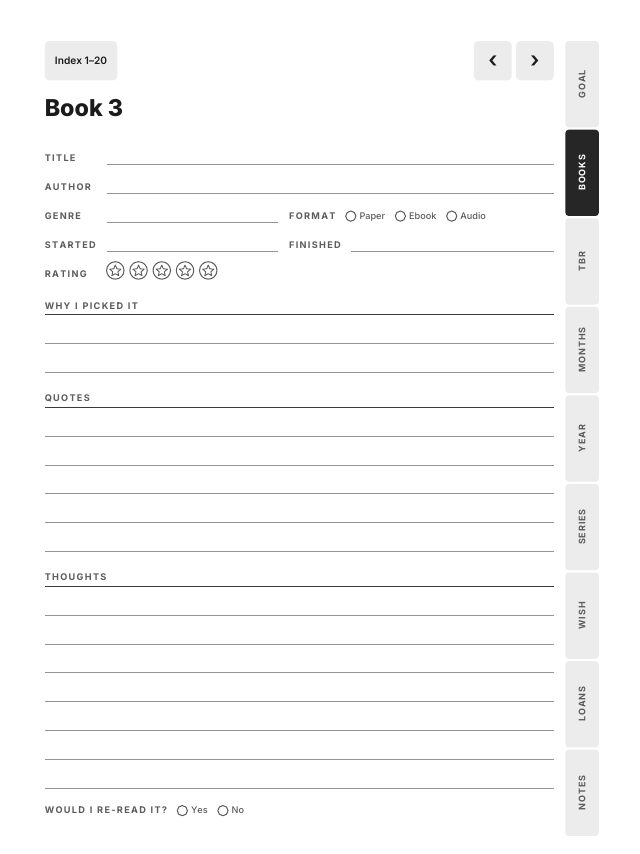
The sheet has the title, author, genre, format as paper, ebook or audio, the dates you started and finished, a rating of five stars, why you picked it, five lines for quotes, lines for your thoughts, and would you read it again. At the top, Index goes back to the index page that holds this book's number, not just to the first one. The arrows move to the previous and next sheet.
All 18,104 links in the 10 files are checked by script, including 2,000 round trips: each of the 100 numbers to its sheet and each sheet back to its index page, in every file. In the Kindle Scribe file, every link also sits at least 10 mm from the top and side edges. Owners have reported that taps very close to the top and right edges of the screen are sometimes missed, and a tap at the top also opens the toolbar.
Wrap up each month
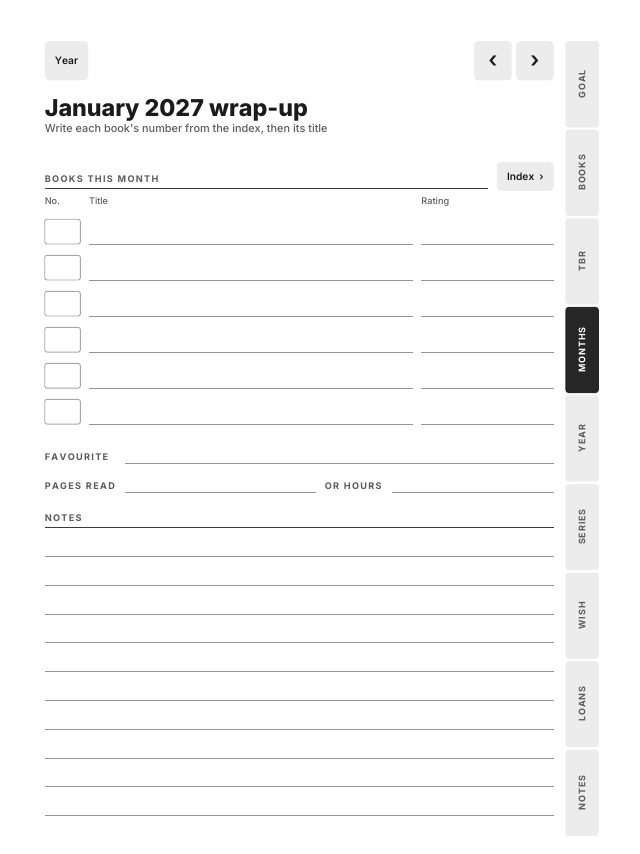
There is a wrap-up page for every month of 2027. It has six lines for the books you finished, each with a No. box for the book's number, the title and a rating, then a favourite, pages read or hours, and notes. The number always comes from the index, so a book has one number everywhere. An Index button on the wrap-up opens the book index when you need to look one up.
The 2027 reading goal page at the front holds your target for the year, a box for each month that opens its wrap-up, a progress bar of 20 steps, and the books you want to finish. At the back, 2027 in books gathers the twelve months in one table, with a button to each wrap-up and a total. Best of 2027 has your top five, ten genres with a count box, the book of the year, the biggest surprise and a list for 2028.
The rest of the journal
- To be read: 100 lines, each with a box to tick.
- Series tracker: 3 pages of 10 series with 8 volumes each.
- Wishlist, Loans with lent to or borrowed from, the date and a returned box, and 5 pages for notes.
Tabs on every page open each part: Goal, Books, TBR, Months, Year, Series, Wish, Loans and Notes.
A routine that takes a minute
- Start a book: take the next number on the index and write the title and author.
- Finish it: tap the number, fill in the sheet while it is fresh, and copy a quote if you marked one.
- End of the month: open the month from the goal page and write the numbers of the books you finished.
Your highlights and notes inside a Kindle book stay with that book. The journal holds what you want to keep about it, in your own hand, in one place for the year.
Other tablets
The same journal comes in Large 3:4 for the reMarkable 2, Paper Pro, Supernote Manta and Boox Note Air, Compact 3:4 for 7.8 inch screens, Move 9:16 for the Paper Pro Move, and an iPad file for GoodNotes, Notability and Noteful. Each comes right- or left-handed, in one download.
Frequently asked questions
- Can I write in a PDF reading journal on the Kindle Scribe?
- Yes, when you send it with Send to Kindle. Amazon's help says the Kindle Scribe doesn't support writing on PDFs loaded via USB-C.
- How many books does the reading journal hold?
- 100 book sheets, each opened from a numbered row on the book index, plus a to-be-read list of 100 lines.
- Does the reading journal work on other tablets?
- Yes. One download has Large, Compact, Move, Kindle Scribe and iPad files, each right- or left-handed.